The ChatBridge
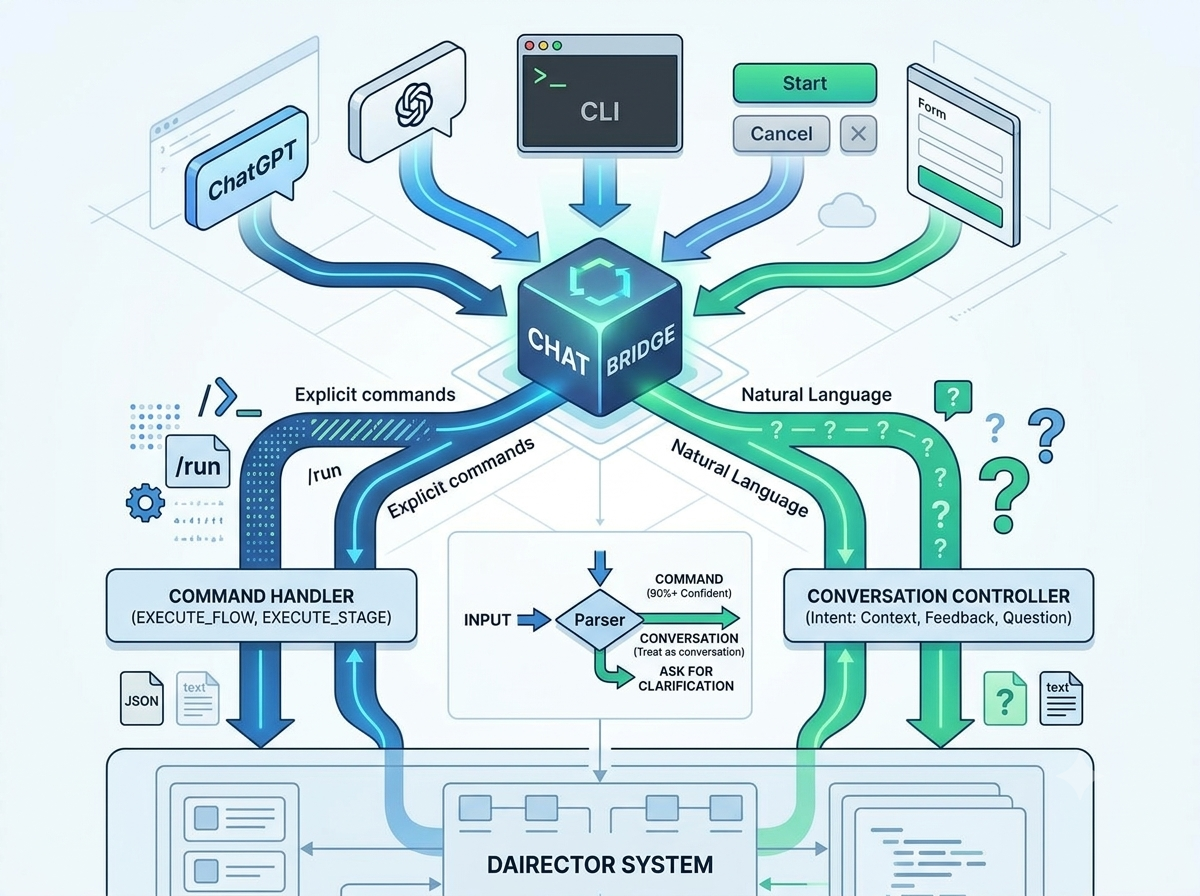
The Input Problem
Every AI tool faces the same question: how does the user communicate with the system?
Some tools use chat (like ChatGPT). Some use commands (like CLI tools). Some use buttons and forms (like traditional UIs).
Dairector needs all three. Sometimes you want to type “run the pipeline” and have it work. Sometimes you want to click a button. Sometimes you want to have a conversation about architecture decisions.
The ChatBridge is the component that makes this possible. It’s the single entry point for all user input, and it routes each input to the right handler.
The Architecture
class ChatBridge {
  async handleInput(input: string): Promise<CommandResult> {
    // Step 1: Parse the input
    const parsed = this.commandParser.parseInput(input);

    // Step 2: Is it a command?
    if (parsed.type === 'command') {
      return this.commandHandler.handle(parsed.command);
    }

    // Step 3: Is it a conversation?
    if (parsed.type === 'conversation') {
      return this.conversationController.handle(parsed.message);
    }

    // Step 4: Unknown — ask for clarification
    return {
      type: 'clarification',
      message: "I'm not sure what you want. Try 'run pipeline' or describe what you're thinking."
    };
  }
}
The Command Parser
The CommandParser uses pattern matching to identify commands:
class CommandParser {
  parseInput(input: string): ParsedInput {
    const trimmed = input.trim().toLowerCase();

    // Explicit commands with prefix
    if (trimmed.startsWith('/')) {
      return this.parseExplicitCommand(trimmed.slice(1));
    }

    // Known command patterns
    const commandPatterns = [
      { pattern: /^(run|execute|start)\s+(pipeline|flow)/, command: 'EXECUTE_FLOW' },
      { pattern: /^(run|execute)\s+(stage\s+)?(\w+)/, command: 'EXECUTE_STAGE' },
      { pattern: /^(show|view|list)\s+(executions|history)/, command: 'LIST_EXECUTIONS' },
      { pattern: /^(cancel|stop|abort)/, command: 'CANCEL' },
    ];

    for (const { pattern, command } of commandPatterns) {
      const match = trimmed.match(pattern);
      if (match) {
        return { type: 'command', command, args: match.slice(1) };
      }
    }

    // Default to conversation
    return { type: 'conversation', message: input };
  }
}
The Conversation Controller
When input isn’t a command, the NaturalConversationController takes over. It uses the LLM to understand intent:
class NaturalConversationController {
  async handle(message: string): Promise<ConversationResult> {
    // Use the LLM to classify intent
    const intent = await this.classifyIntent(message);

    switch (intent.type) {
      case 'context_update':
        // "I think we should use PostgreSQL instead of MongoDB"
        return this.handleContextUpdate(intent.changes);

      case 'question':
        // "Why did you choose that architecture?"
        return this.answerQuestion(message);

      case 'feedback':
        // "The last design doesn't handle edge cases well"
        return this.handleFeedback(intent.feedback);

      case 'thinking':
        // "Hmm, I wonder if there's a better approach..."
        return this.acknowledgeAndContinue();
    }
  }

  private async classifyIntent(message: string): Promise<Intent> {
    const prompt = `
      Classify the following message from a developer using an AI coding assistant.

      Message: "${message}"

      Possible intents:
      - context_update: The user wants to change project context
      - question: The user is asking a question
      - feedback: The user is giving feedback on previous output
      - thinking: The user is thinking out loud

      Respond with JSON: { "type": "intent", "details": {...} }
    `;

    const response = await this.llm.call(prompt);
    return JSON.parse(response.content);
  }
}
The Dual-Mode Magic
The real power is that users don’t need to learn the system. New users can type naturally: “I want to add authentication to my API.” The system figures out they want to run the pipeline with that context.
Power users can be explicit: “/run stage analyze” or “execute pipeline”. The system recognizes the command pattern and skips the classification step.
This dual-mode design means the tool is accessible to beginners but efficient for experts. No modal switching. No “type /help to see commands.” Just type what you mean.
What I Learned
The hardest part wasn’t the parsing. It was handling ambiguity gracefully. When the system isn’t sure what you want, it should ask — but not too often. Every clarification request is a friction point.
The solution was confidence thresholds. If the parser is >90% confident it’s a command, execute it. If >70%, ask for confirmation. Below that, treat it as conversation.
This isn’t perfect. Sometimes the system executes when it shouldn’t. Sometimes it asks when it should know. But it’s good enough to feel natural, and that’s the goal.
Next post: The Service Container — Dependency Injection for AI Tools